The camera was announced just couple days ago and there are two programs that already can support X-T1 raw file conversion:
Iridient Developer 2.3.3
and LightZone 4.1.0 beta 6 (free)
My 'quick'n'dirty' comparison.
Showing posts with label X-Trans RAW. Show all posts
Saturday, 1 February 2014
Friday, 24 January 2014
My Workflow for X-Trans RAW Processing
I was using Lightroom since its first iteration and it worked well with all my cameras and files. Until I acquired Fujifilm X-Pro1. I quickly realized that ACR demosaicing (Lightroom's raw de-coding engine, same as in CS/Photoshop) is not the best choice for x-trans raw files.
There are much better raw converters on the market, but Lightroom is still, arguably, the best digital asset management system. I was asking myself, how can I combine the power of LR asset management with the best demosaicing algorithms? After spending hours of testing of various configurations I finally came up with the workflow that works well for me and my x-trans raw files. I am using it for 4 months now and feel comfortable to share with you.
I will illustrate my workflow using LR+Iridient Developer integration, albeit the same integration works well with Capture One Express, Aperture or Photo Ninja. As the matter of fact I have all of them and they all are integrated into the same workflow.
Here is my setup and step by step instructions.
There are much better raw converters on the market, but Lightroom is still, arguably, the best digital asset management system. I was asking myself, how can I combine the power of LR asset management with the best demosaicing algorithms? After spending hours of testing of various configurations I finally came up with the workflow that works well for me and my x-trans raw files. I am using it for 4 months now and feel comfortable to share with you.
All logos are property of their respective owners.
I will illustrate my workflow using LR+Iridient Developer integration, albeit the same integration works well with Capture One Express, Aperture or Photo Ninja. As the matter of fact I have all of them and they all are integrated into the same workflow.
Here is my setup and step by step instructions.
Wednesday, 2 October 2013
Photo Ninja 1.2.0 with X-Trans support
PictureCode just released version 1.2.0 of their very popular professional-grade raw converter Photo Ninja.
This update comes with initial support for Fuji X-Trans cameras (X-Pro1, X-E1, X-100S, X-M1, X20). Note that highlight recovery, in particular, is not yet implemented for the X-Trans. Full change log is here.
I quickly compared this latest release to LR5, C1 and Iridient Developer. Here is my first impression.
This update comes with initial support for Fuji X-Trans cameras (X-Pro1, X-E1, X-100S, X-M1, X20). Note that highlight recovery, in particular, is not yet implemented for the X-Trans. Full change log is here.
I quickly compared this latest release to LR5, C1 and Iridient Developer. Here is my first impression.
Tuesday, 13 August 2013
Iridient Developer 2.2 (quick comparison)
Iridient Developer is arguably the best RAW converter for Fuji X-Trans raw files. About a month ago I tested Iridient 2.1 and was really impressed. My review is here. The latest 2.2 update brought additional features, improvements and bug fixes for Fujifilm X.
New Features:
New, smoother "Soft Look" demosaic option for Fuji X-Trans models.
Added support for Fujifilm RAW daylight, cloudy and tungsten white balance presets for most recent models.
Added support for automatic RAW lens distortion and vignetting correction metadata for many Fujifilm models.
Support for Fujifilm X-M1
Improvements:
Modified tone curve and baseline exposure for Fujifilm X-Trans models to better match other software and camera JPEGs.
EXIF 2.3 lens model information should now be displayed in Preview window for many more camera models, including the Fuji X-Trans models.
Bug Fixes:
Fixed bug with "Soft Look" checkbox and the Fuji X-Trans cameras. Now, like with Bayer/Foveon RAW models this option enables an alternate, smoother demosaic (RAW interpolation) method.
Fixed ISO gain adjustment for Fuji X-Trans models at ISO 3200 and 6400.:
Full Release Notes
I quickly compared Iridient 2.2 to Aperture 3.4. 5 and Lightroom 4.4
Thursday, 11 July 2013
Iridient Developer 2.1.1 (with X-Trans support)
Iridient Developer is a powerful RAW image conversion application designed and optimized specifically for Mac OS X. On June 25th Iridient Digital introduced version 2.1.1. This release caught attention of many Fui X-Trans users because: “X-Pro1, X-E1, X20 and X100S now natively supported by new demosaic process in addition to existing support using Apple RAW libraries”
Almost immediately several bloggers compared Iridient to ACR 8.1 and posted their raving reviews on the net. Great, but we all know that ACR does less than a stellar demosaicing of x-trans raw files.So I decided to compare Iriridient Developer 2.1.1 to Aperture 3.4.5 and Capture One Express 7.1.3, because, in my opinion, they both are excellent tools and handle RAF files way better than ACR 8.1.
Iridient interface is well thought, logical and easy to use. There are plenty of options and controls but what would be the best method/settings combination?
Wednesday, 10 July 2013
DCRAW 9.19
* July15th Update: Colour Noise
DCRAW is a very popular Open Source raw converter developed by Dave Coffin. DCRAW supports almost every raw format available on the market and is used by a large variety of imaging programs, including Adobe, ACDSee, RPP, RawTherapy, LightZone, etc.
Just 6 months ago DCRAW 9.17 was possibly the best raw converter for x-trans files. The level of details was amazing, no "foliage" or "colour bleeding" issues but it came with the price - so called "zipper aliasing".
Couple weeks ago version 9.19 was released and I quickly tested it. For test purposes I used raw file available at DPReview (Respective Owner, thank you and let me know if you would like to remove it from this review)
I am impressed, the image looks very crisp and clean. Dave, job well done!
*** After doing some additional testing and pixel-peeping I found some weird colour noise in the some of my output files.
What strange is that noise (colour artefacts?) appears to be identical to Aperture.
Thanks,
vkphoto
DCRAW is a very popular Open Source raw converter developed by Dave Coffin. DCRAW supports almost every raw format available on the market and is used by a large variety of imaging programs, including Adobe, ACDSee, RPP, RawTherapy, LightZone, etc.
Just 6 months ago DCRAW 9.17 was possibly the best raw converter for x-trans files. The level of details was amazing, no "foliage" or "colour bleeding" issues but it came with the price - so called "zipper aliasing".
Couple weeks ago version 9.19 was released and I quickly tested it. For test purposes I used raw file available at DPReview (Respective Owner, thank you and let me know if you would like to remove it from this review)
-v -w -o 1 +M -T
I think that DCRAW code (at least related to x-trans sensor) was significantly re-written, "zipper" effect is gone. But the output image looks a bit softer. Easy fix with USM.I am impressed, the image looks very crisp and clean. Dave, job well done!
*** After doing some additional testing and pixel-peeping I found some weird colour noise in the some of my output files.
What strange is that noise (colour artefacts?) appears to be identical to Aperture.
Thanks,
vkphoto
Saturday, 27 April 2013
Testing Aperture 3.4.4 with X-Trans support
Today I decided to test Aperture one more time, just to see if my first impression was right.
I took Fujifilm X-Pro 1 with Fujinon 35mm on a short walk along the trail in the area. And then I processed all raw files in Aperture only.
Thursday, 25 April 2013
Lightroom 4.4 (ACR7.4) vs. Capture One Express 7.1.1 vs. Aperture 4.05 (X-Trans)
Hi All,
As usually I do not pretend that my test is a scientific research. I was looking for a Fujifilm X-Pro 1 raw file converter that works for me and would like to share my findings. I excluded supplied RFC (SilkyPix) from this comparison simply because I don't like its interface and hardly can imaging using it in the future. But don't get me wrong, RFC is very capable raw converter.
I leveraged Raw Photo Processor 4.7.0 (excellent free raw converter) to see how much details Aperture can resolve.
For test purposes I used my own files and raw files available from DPReview and Ryan Williams (Respective Owners, thank you and let me know if you would like to remove them from this review)
The file above was processed (with some adjustment) with three different engines but results look very similar. Why?
For test purposes I used my own files and raw files available from DPReview and Ryan Williams (Respective Owners, thank you and let me know if you would like to remove them from this review)
The file above was processed (with some adjustment) with three different engines but results look very similar. Why?
Labels:
ACR,
Aperture,
Capture One 7 Express,
Lightroom,
X-Trans RAW
Sunday, 7 April 2013
My two Lightroom 4.4 presets for X-Trans CMOS
Last week Adobe released Lightroom 4.4 with enhanced support for Fujifilm X-Trans CMOS. This upgrade was result of joint Fujifilm and Adobe efforts, you can read the full story here.
With this release Adobe significantly improved demosaicing algorithm to address previous so called "water colour" and "colour bleeding" issues with X-trans CMOS raw files, albeit not 100% but they were reduced to a negligible level.
Great news. But I was disappointed to see that default output looked somewhat soft and dull. Sure I spent time working on sharpening and colour adjustments to make X-Pro 1 raw files look to my liking.
With this release Adobe significantly improved demosaicing algorithm to address previous so called "water colour" and "colour bleeding" issues with X-trans CMOS raw files, albeit not 100% but they were reduced to a negligible level.
Great news. But I was disappointed to see that default output looked somewhat soft and dull. Sure I spent time working on sharpening and colour adjustments to make X-Pro 1 raw files look to my liking.
Monday, 25 February 2013
ACR 7.4 (RC) vs. Capture One 7 Express
Today is a special day for Fuji X-Trans users. Finally, Adobe has released ACR 7.4 with an improved X-Trans support, and, on the same day as Phase One released their affordable Capture One 7 Express. So what's so special?
Here is some background.
Since Fujifilm launched its revolutionary X-Trans in early 2012 the only software that properly supported raw file conversion was bundled RFC (aka SilkyPix). Almost immediately after the launch Adobe released their update to include Fuji X-Pro but it came out with important deficiency. Some converted files could suffer from "water colour" effect and / or "colour bleeding".
Nobody wanted to admit that issue does really exist. Fuji pointed fingers at Adobe, Adobe at Fuji and so on and so forth. Apple Aperture and Phase One didn't even mention Fuji X-Pro1 as their supported camera. Open source solutions (mostly DCRAW based) were good but suffered from so called "zipper" effect. The game changed in December 2012, when Phase One came out with really good demosaicing algorithm (Capture One Pro 7.0.2).
Here is some background.
Since Fujifilm launched its revolutionary X-Trans in early 2012 the only software that properly supported raw file conversion was bundled RFC (aka SilkyPix). Almost immediately after the launch Adobe released their update to include Fuji X-Pro but it came out with important deficiency. Some converted files could suffer from "water colour" effect and / or "colour bleeding".
Nobody wanted to admit that issue does really exist. Fuji pointed fingers at Adobe, Adobe at Fuji and so on and so forth. Apple Aperture and Phase One didn't even mention Fuji X-Pro1 as their supported camera. Open source solutions (mostly DCRAW based) were good but suffered from so called "zipper" effect. The game changed in December 2012, when Phase One came out with really good demosaicing algorithm (Capture One Pro 7.0.2).
Friday, 18 January 2013
RPP vs ACR vs Capture One 7 (Fuji X-Trans RAF)
* 2013-01-20 Important update about "zipper" effect. Please see new test results below.
Finally I had a chance to process Fuji raw files with highly regarded Raw Photo Processor
RPP is "no frills" free converter developed by Andrey Tverdokhleb. I recommend to read RPP for Beginners, it is really a good starting point to learn the basics of the tool.
Finally I had a chance to process Fuji raw files with highly regarded Raw Photo Processor
RPP is "no frills" free converter developed by Andrey Tverdokhleb. I recommend to read RPP for Beginners, it is really a good starting point to learn the basics of the tool.
For my RPP vs ACR vs C1 comparison I used the file provided by DPReview, here is the link . All "Tram 1051" pictures are property of DPReview.com
Labels:
ACR,
Capture One 7 Express,
Raw Photo Processor,
X-Trans RAW
Monday, 7 January 2013
Capture One Pro 7.0.2 (beta) with X-Trans support
I was "raw only" shooter since I purchased my first digital camera in 2001. In the past 12 years I used almost every professional or high end digital camera offered by Canon, Nikon, Sony, Panasonic or Olympus but never liked "out of the camera" jpegs , until the Fujifilm X-Pro1's arrived. I was pleasantly surprised to find out that in most cases OOC jpeg files were just perfect and didn't require any further post processing. But we all know jpeg limitations and advantage of using raw files. Sometimes I was missing the flexibility of raw files when the image was required additional fine tuning of white balance, highlights, etc. So I decided to shoot in RAW+F mode and process raw files only when it was needed. Supplied Raw File Converter EX (powered by SilkyPix) produced fair results but I didn't like its interface. In-camera converter worked well but the workflow become an issue. Lightroom's workflow was excellent and output was very good, but with one important exception. Pictures with tiny foliage exhibited a very strange "water colour" (a.k.a. "smearing") effect. Let me illustrate the issue with one of my typical photo.
The scene with foliage
Shooting conditions: Fujifilm X-Pro 1, Fujinon 35mm @ F8, RAW+F (std), Auto WB, ISO 200, tripod, cable release. Now lets open RAF file in ACR 7.3.
Thursday, 11 October 2012
Fujifilm RAW files conversion
Couple weeks ago Adobe announced Lightroom 4.2 and Camera Raw 7.2 Final Releases. I tested them to see if there any improvement for Fuji RAF files. I took a shot of a leafy scene with image quality F+RAW and image size L3:2. RAF file was converted using three methods: ACR 7.2, in camera and Silkypix. OOC jpeg is posted as is.
After careful inspection and comparison I came to conclusion that, unfortunately, ACR 7.2 didn't address the issues with "water color, smearing" effect. OOC and In-camera converted files are identical. Silkypix still produces more natural colors and resolution/details.
Thanks,
vkphoto
After careful inspection and comparison I came to conclusion that, unfortunately, ACR 7.2 didn't address the issues with "water color, smearing" effect. OOC and In-camera converted files are identical. Silkypix still produces more natural colors and resolution/details.
Thanks,
vkphoto
Monday, 24 September 2012
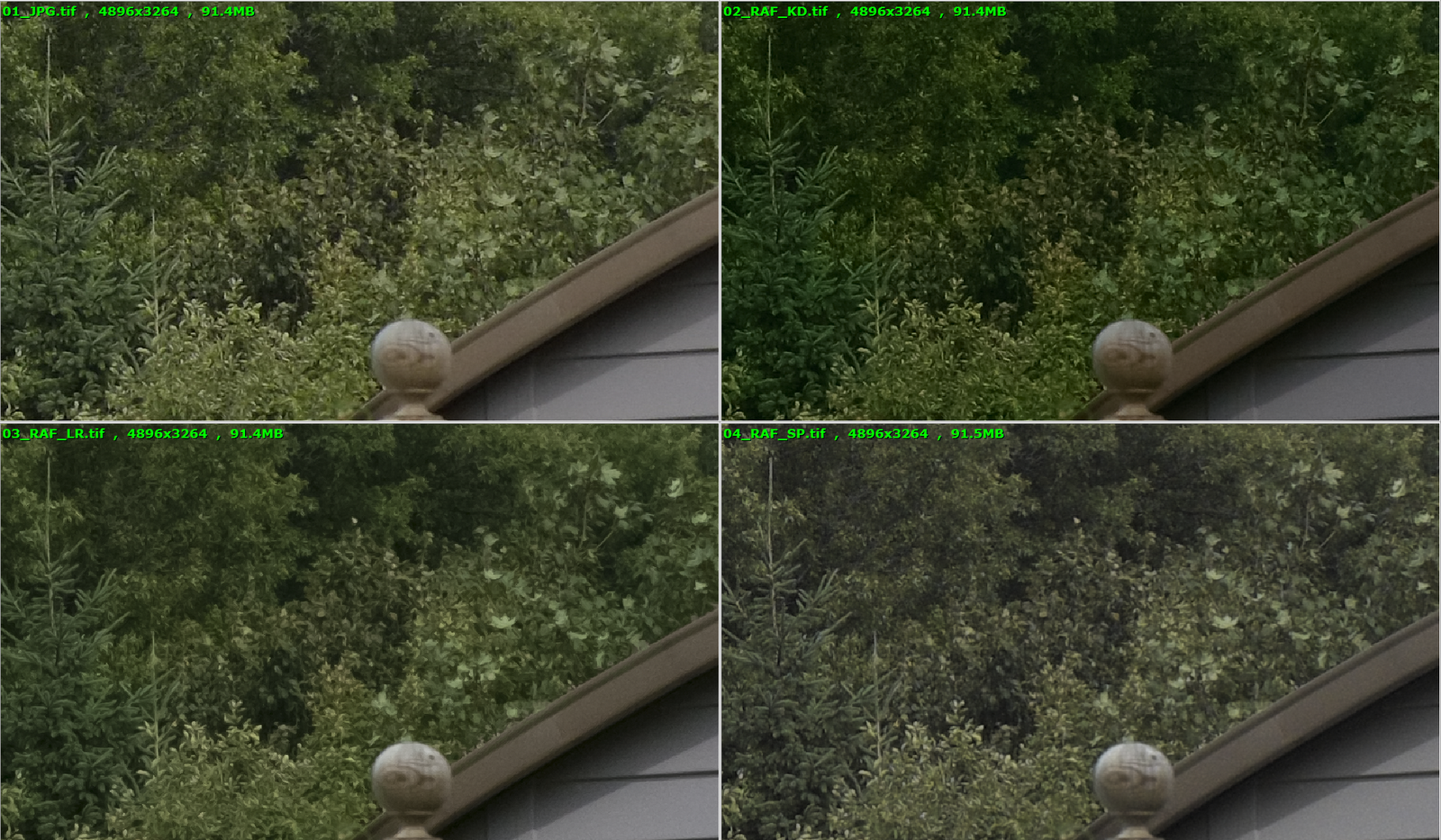
X-PRO 1 RAW file processing
As you all aware there is an issue with with X-PRO 1 raw files. Lightroom creates a watercolor effect and provided Silkypix converter creates washed out images and it is too cumbersome to use. But I was and still am extremely happy with OOC jpeg files. Images are clean, colorful and sharp.
Today I tried a new workflow published by Kinematic Digit on Flickr and it works really well. Here is my comparison:
01_JPG.tif - OOC jpeg
02_RAF_KD.tif - raw file converted using KD's method
03_RAF_LR.tif - raw file converted with LR standard settings
04_RAF_SP.tif - raw file converted with Silkypix
Results are very good but I still can't still justify an extra work.
Cheers,
vkphoto
Today I tried a new workflow published by Kinematic Digit on Flickr and it works really well. Here is my comparison:
01_JPG.tif - OOC jpeg
02_RAF_KD.tif - raw file converted using KD's method
03_RAF_LR.tif - raw file converted with LR standard settings
04_RAF_SP.tif - raw file converted with Silkypix
Results are very good but I still can't still justify an extra work.
Cheers,
vkphoto
Thursday, 21 June 2012
X-PRO 1: JPEG vs RAW (LR4.1+SILKYPIX+OOC jpeg)
Hello!
After posting initial output from LR 4.1 I had received an overwhelming response to re-test with different setup.
Thank you for all recommendations and suggestions. So I decided to re-test with the following modifications.
1. Use standard FUJINON 35mm lens @ 5.6
2. Re-shoot long and close range scenes using jpeg and RAW @ 200 ISO
3. Add SILKYPIX output for the reference
Another recommendation was to use a custom X-PRO1 profile for LR4.1 but couldn't find one yet.
After posting initial output from LR 4.1 I had received an overwhelming response to re-test with different setup.
Thank you for all recommendations and suggestions. So I decided to re-test with the following modifications.
1. Use standard FUJINON 35mm lens @ 5.6
2. Re-shoot long and close range scenes using jpeg and RAW @ 200 ISO
3. Add SILKYPIX output for the reference
Another recommendation was to use a custom X-PRO1 profile for LR4.1 but couldn't find one yet.
Friday, 8 June 2012
X-PRO 1: JPEG vs RAW (LR4.1+SILKYPIX+OOC jpeg)
Hello!
After posting initial output from LR 4.1 I had received an overwhelming response to re-test with different setup.
Thank you for all recommendations and suggestions. So I decided to re-test with the following modifications.
1. Use standard FUJINON 35mm lens @ 5.6
2. Re-shoot long and close range scenes using jpeg and RAW @ 200 ISO
3. Add SILKYPIX output for the reference
Another recommendation was to use a custom X-PRO1 profile for LR4.1 but couldn't find one yet.
After posting initial output from LR 4.1 I had received an overwhelming response to re-test with different setup.
Thank you for all recommendations and suggestions. So I decided to re-test with the following modifications.
1. Use standard FUJINON 35mm lens @ 5.6
2. Re-shoot long and close range scenes using jpeg and RAW @ 200 ISO
3. Add SILKYPIX output for the reference
Another recommendation was to use a custom X-PRO1 profile for LR4.1 but couldn't find one yet.
Saturday, 19 May 2012
Background
It all started around 1984 when I got my first camera, then I developed my first film, then I printed my first picture in the darkroom and ... my life had changed forever. Since then photography has become my biggest passion in life. I had and still have some great lenses and cameras, anything from old 4x5 view cameras to modern full frame DSLRs. I am brand agnostic and using whatever camera is available or feels right for the moment.
From '80s. ICA A-G DRESDEN (old German camera circa 1912), 9 x 12 cm glass plate. Inspired by Joseph Sudek.
And few more photos.
Labels:
canon,
digital,
film,
Fujifilm X-Pro 1,
Fujinon XF 35/1.4,
Fujinon XF 55-200,
Instagram,
large format,
nikkor,
nikon,
photography,
rokkor,
X-Trans RAW
Subscribe to:
Comments (Atom)